JPG vs PNG vs WebP: Which Format to Choose in 2026

Use JPG or WebP for photos, since both compress photographic detail efficiently and produce a much smaller file than PNG for the same image. Use PNG when the image needs a transparent background or is a flat graphic like a logo, icon or screenshot with sharp edges and few colours. WebP covers both cases reasonably well in one format, which is why it has become the common default, but understanding what each format is actually built for makes the choice obvious instead of arbitrary.
What each format is actually built for
JPG (or JPEG) uses lossy compression tuned specifically for photographs: it throws away detail a human eye is unlikely to notice, especially in colour information, and keeps the rest. That tradeoff works extremely well for a photo's gradual colour transitions and works badly for sharp edges and flat colour, which is why a JPG screenshot of text often looks slightly fuzzy around the letters.
PNG is lossless: every pixel is stored exactly, with compression applied to repeated patterns rather than by discarding detail. That makes it excellent for graphics with large flat areas and hard edges, and it is the only one of the three formats in universal use that has always supported a genuinely transparent background. The same losslessness makes it a poor choice for a photograph, since there is far less repeated pattern in a photo's fine detail for PNG's compression to take advantage of.
WebP is newer and does both jobs in one format: a lossy mode aimed at JPG's territory, usually smaller than JPG at a comparable visual quality, and a lossless mode aimed at PNG's territory, usually smaller than PNG for the same graphic. Every current browser displays WebP, which is why it is increasingly the default rather than the alternative.
Real numbers for the same image
The table below is a real estimate from Imagenati's own File Size Calculator for a 1920 x 1080 photo, the same pixel dimensions saved at different quality levels and formats. These are estimates based on typical compression for each format and quality setting, not a single fixed number, since a busy, detailed photo compresses differently than a simple one, but the relative gap between formats holds consistently.
| Format | Estimated size at 1920 x 1080 |
|---|---|
| JPEG, high quality | 759 KB |
| JPEG, medium quality | 380 KB |
| JPEG, low quality | 203 KB |
| PNG (uncompressed photo) | 3.56 MB |
| WebP | 266 KB |
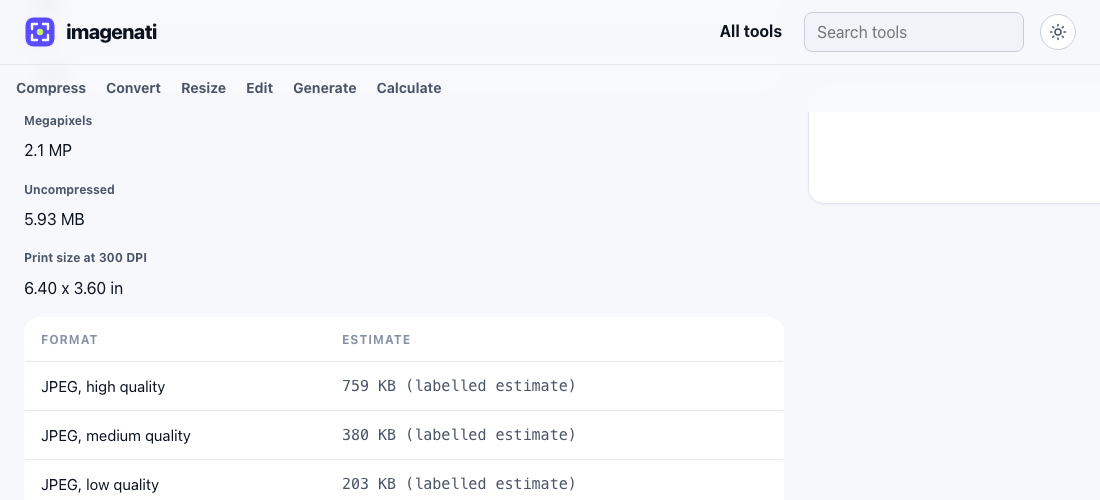
PNG's 3.56 MB for the same photo, several times larger than even the high quality JPEG, is the number worth remembering: it is the single clearest evidence that PNG is the wrong format for a photograph, no matter how good PNG is at other jobs.
A quick decision guide
- A photo from a camera or phone, no transparency needed: WebP, or JPG if WebP is not an option.
- A logo, icon or illustration with a transparent background: PNG, or WebP's lossless mode.
- A screenshot of text, a UI or a document: PNG, since JPG's compression softens sharp edges and text.
- An animated image: neither JPG nor PNG support animation; use GIF, or a video format for anything longer than a few seconds.
- Uncertain, or the image will be used in several places: WebP covers photographic and flat content reasonably well in one format.
Why WebP has not fully replaced the other two
A handful of older tools, some email clients, and some print or design workflows still do not accept WebP, which is a compatibility question rather than a quality one. JPG remains the safer universal default when a file is going somewhere unpredictable, an email attachment, an unfamiliar upload form, an older piece of software. PNG stays relevant specifically for lossless editing: a design file that will be edited again later benefits from staying lossless between edits, rather than accumulating generation loss from repeated lossy saves.
Transparency and colour depth, in more detail
JPG has never supported transparency in any form, a limitation baked into the format from the start rather than a missing feature. PNG supports full transparency, including partial, semi see through pixels rather than only fully see through or fully solid, which is what makes a soft drop shadow or an anti-aliased circular logo possible without a visible hard edge. WebP matches PNG here: its lossless mode supports the same kind of full alpha transparency, and its lossy mode also keeps a transparency channel, which is not something JPG can do at any quality setting.
Colour depth is a smaller but related difference. Standard JPG and PNG both commonly work in 8 bit colour per channel, which is more than enough for almost every use on a screen. Where this matters is a graphic with a very large flat colour area and a subtle gradient inside it, like a smooth sky in an illustration, where a PNG saved with too few colours in its palette can show visible banding, hard steps between shades that should blend smoothly. Saving that kind of image with a fuller colour range, or exporting it as JPG or WebP instead where a flat colour area is not the primary content, usually avoids it.
What about AVIF and other newer formats
AVIF is a newer still image format that can beat WebP on file size in some cases, and browser support has grown steadily. It is not yet as universally supported or as widely used across web tools, image editors and content systems as JPG, PNG and WebP, which is why this guide, and Imagenati's own converters, focus on the three formats an image is overwhelmingly likely to actually need. Worth knowing about for the future, not yet worth switching a whole workflow over for most sites.
Switching between them
Converting between these three formats does not require re-shooting a photo or rebuilding a graphic from scratch. The Image Converter handles any of the six common pairings in one place, while JPG to PNG and PNG to WebP have their own dedicated pages if a specific conversion is the only thing needed. Converting a lossy JPG to PNG cannot recover detail the JPG already discarded; it just stops further loss from that point on. Converting the other direction, PNG to JPG or WebP, is where the real file size win happens, since that is moving from a lossless format into one built for smaller files.